 My Farm 3D
The guide for land agents
Your listing kit, and where each piece goes
Every piece of the kit, the place it goes and the way to it in the app. Then the four rules that come with it. One page to keep open while you list.
At a glance
Where each piece goes
Five places a listing reaches buyers, and what to put in each.
Your listing page
EmbedPicturePaste the embed under the photos: buyers walk the land without leaving your page, with your name under the view.
The MLS virtual tour field
MLS linkThe MLS link only: no branding, no contact details, and it opens on the land as it is today.
A social post
PictureYour linkThe picture, with your link in the words of the post.
The sign and the flyer
QR codePictureThe QR code of your link: “Scan to walk the homestead.” The picture goes on the flyer too.
An email to a buyer
Buyer linkReportTheir own link, so you see when they open it and come back, and the report with a cover prepared for them.
In the app
Getting each piece
Before your first listing
Fill in your Agent profile
Name and brokerage are required before your links are branded. Add your phone, photo and logo too.
Plan it as…
Find the land, then pick one of the six buyer presets, or answer the cards yourself. Building takes a minute or two.
Turn sharing on
Your link and the MLS link appear, each with its QR code. The kit below is what Share opens on a listing.
The kit, piece by piece
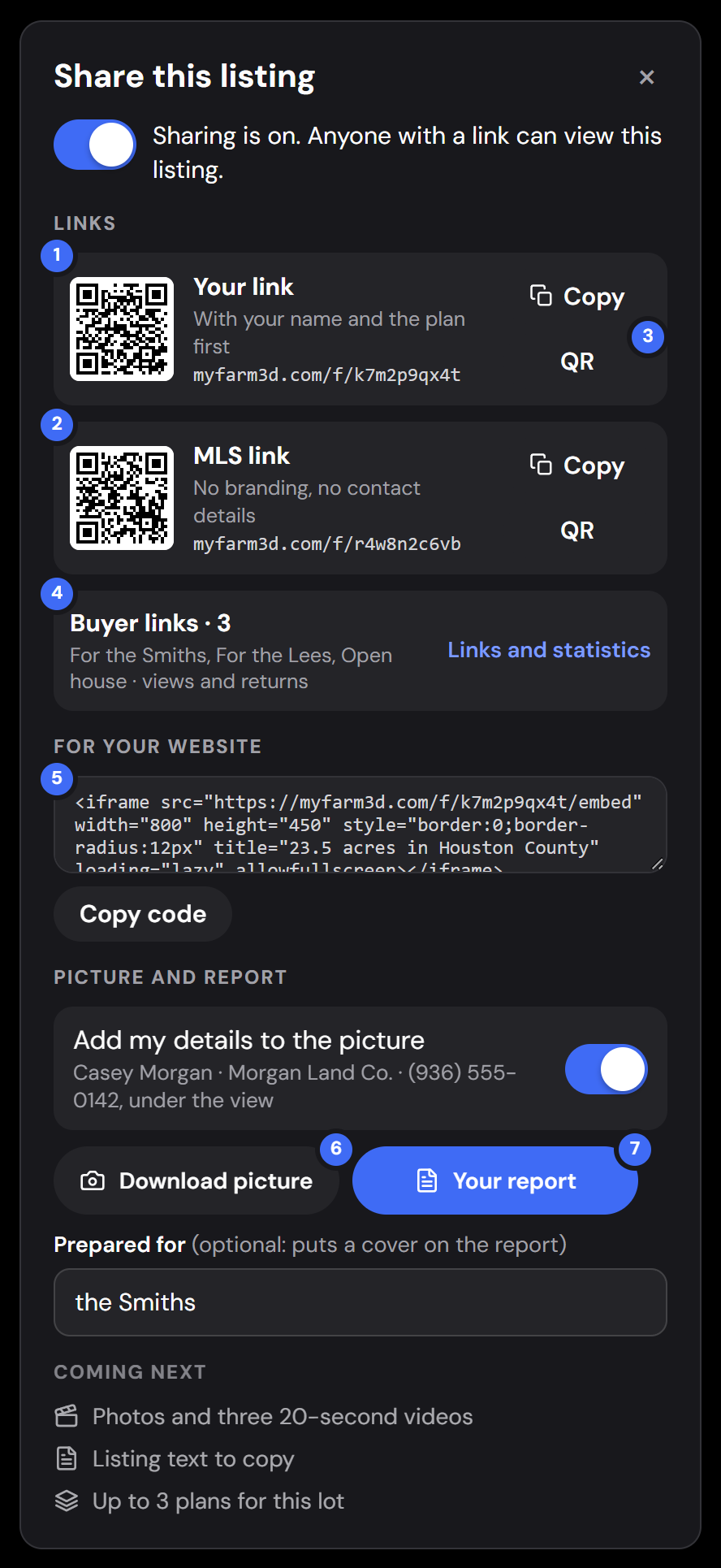
Your link
LiveThe 3D homestead with your name on it, opening on the plan. Buyers need no account.
- Goes on
- A social post, your listing page, a text or an email
- In the app
The MLS link
LiveNo branding and no contact details. It opens on the land as it is today, with the plan one tap away.
- Goes on
- The MLS virtual tour field
- In the app
The QR code
LiveYour link (or the MLS link) as a QR code to print, as a PNG or an SVG.
- Goes on
- The sign, the flyer, the open-house table
- In the app
A link for each buyer
LiveNamed for the buyer (“For the Smiths”), with its own views, visitors, returns and average time, day by day.
- Goes on
- An email or a text to that buyer
- In the app
- or
The embed
LiveThe 3D homestead inside your own website, with your name, brokerage and phone under it.
- Goes on
- Your listing page
- In the app
The picture
LiveA still of the 3D view from the angle you left it at, with your details under it.
- Goes on
- A social post, the flyer, the listing photos
- In the app
The report, with your logo
LiveThe land report as a PDF of up to 10 pages, your logo and name on every page. A buyer’s name in “Prepared for” puts a cover on it.
- Goes on
- An email to a buyer, a showing
- In the app
Photos and video
LiveSix pictures and three 20-second videos of this plan, made from its 3D view, for listing sites and social posts.
- In the app
Your photos and tours on the land
LivePin your own photos, drone clips and 360° tours where they were taken. Buyers see them as pins on the 3D land, on every link and the embed, and a tap opens one.
- In the app
Listing text
LiveNotes on the site for the listing, written from the plan’s facts: slope, soil, flood zone, road and power. Read it through before it goes on a listing.
- In the app
An email when a buyer comes back
Coming nextWhen a buyer opens their link again, you hear about it.
On every listing, with nothing to copy
Six buyer presets
LiveHorse property, Hobby farm, Off-grid homestead, Cattle and hay, Market garden and Weekend retreat. The listing’s page says which one planned it: “Planned as …”.
- In the app
The full 3D on every link
LiveFirst person, the cinematic, the sun at any hour, the layers, and “The land today · The plan”. Buyers find them beside the view.
- In the app
- Nothing to turn on
The rules
Four rules for every listing
They hold for every piece of the kit, wherever it goes.
Keep the two labels on everything
Conceptual plan · illustration onlyGenerated from public data. Not a survey, appraisal or legal advice.They are on every link, the embed, the picture and the report. Don’t crop or cover them, and add them to any words you write about the plan.
MLS rules differ, so check yours
Each MLS sets its own rules for virtual tours. Put the MLS link in the virtual tour field, never your branded link, and only where your MLS allows one.
Say what the plan shows, and no more
A plan is one possible homestead. Make no claim about what the land can carry, what can be built on it, what it is worth, or that it will sell faster.
Say it this way“A possible homestead, planned on its terrain.”
Use a buyer’s details only for their request
A buyer who writes or calls about a listing gave you their details to answer that request. Answer it; don’t add them to a mailing list or pass them on.
Conceptual plans, for illustration only. Generated from public data. Not a survey, appraisal or legal advice.